
API Keys makes API access easier to manage for administrators. Site administrators can fully control which users are able to use APIs via preferences. Your integration code is simpler, with fewer moving parts to maintain. API keys do not require token exchange, encoding, or caching logic.
Who can create API Keys?
API Key creation is controlled by your administrators, so your organisation decides exactly who is able to generate keys.
This can be configured Globally, by Accounts, or by User via the Accounts > Global Preferences > Advanced > Can use API Keys
🔔Note: For more information on setting Global Preferences see Global/Account/User Preferences.
Once permissions have been assigned, users can then create the API key or keys from their user profile page.
Creating and managing your keys
Users with permission can create and manage their keys from API key management page, via the edit profile page.
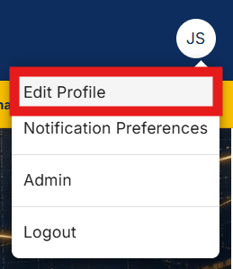
Select Manage API Keys
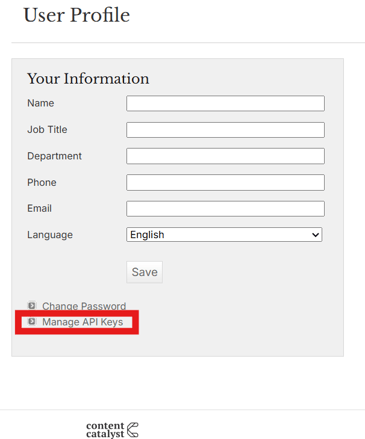
Follow steps below to create the keys.
- Create a key — each user can hold up to 6 API keys at a time. This makes it easy to use separate keys for different integrations or environments.
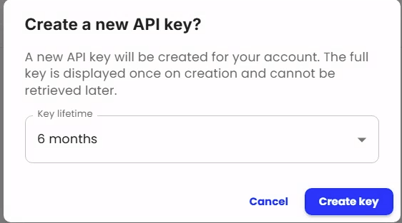
- Set a lifetime — Use the Key lifetime dropdown menu to specify how long it remains valid, up to a maximum of 24 months.
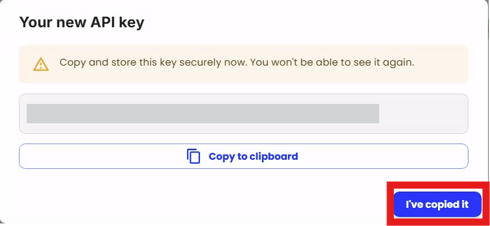
- Copy The new API key — For security, the key value itself is only visible at the moment of creation. Make sure you copy and store it securely at that point. Afterwards, you cannot view the key again. You can view data about your existing keys — such as their status and lifetime — but never the key value itself. If a key is lost, simply delete it and create a new one.
- Enable or disable a key — keys can be disabled off without being deleted, which is useful if you need to pause an integration or investigate unexpected activity.
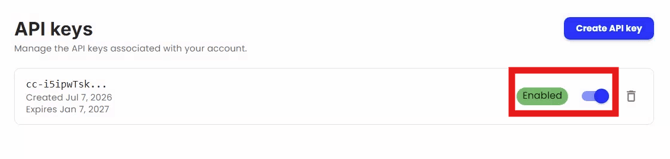

- Delete a key — permanently removes the key so it can no longer be used.
Reporting API Keys
To view users who currently have API keys assigned, administrators can run the List API Key Users report under Admin > General. This report displays all users allowed to use API Keys.
The report can be downloaded as a .xlsx file.
Managing keys via the API
Key management is also available through the API itself, so everything you can do on the key management page — creating, listing, enabling, disabling, and deleting keys — can be automated as part of your own workflows. As with the management page, listing keys returns details about each key but never the key value.
Getting started using API keys
Once a Key has been created simply follow the steps below to authenticate API calls:
-
Add the
X-Api-Key $mykeyas a header to your API requests -
Remove your old Basic authentication logic if this is still being used.
API Keys allow for easier API access with less code and better control overall for your users.