.png?width=200&height=89&name=CC%20logo%20blue-1%20(1).png)
Overview
A report can be given a 'Private' status which restricts visibility to single title licensed users only, hiding it completely from marketing pages. This includes Showcase, category, and search for unlicensed users.
Reports with Private status are also excluded from Category Wide Licensing.
🔔Note: Admin users will still be able to view 'Private' Reports as normal regardless of licensing.
Use Cases of setting a private status report
Setting a report status to 'Private' could be used for the following:
- Custom / commissioned research delivered to a single client account
- Consulting deliverables or bespoke data cuts sold alongside syndicated subscriptions
- Early / embargoed access for premium-tier subscribers before general release
- Sensitive content (pricing studies, competitive analysis) a client doesn't want other accounts to know exists
Setting a Private Status report
The report can be set at any point. This needs to be done be an admin user with Report or Analyst admin permissions. See Assigning Admin Access to a User.
To set the report status to private, head to Admin > Reports
Select the report you wish to edit.
Select the Edit tool.
Use the Status dropdown to update.
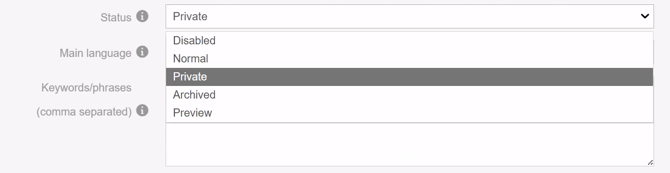
🔔Note: For more information on report statuses see Setting and Editing the Report Status.
Summary
Custom reports uploaded to the platform can be licensed to an individual user or a specific account and marked as private.
Once set as private, the report is visible only to the licensed user or account — it will not surface anywhere else on the platform.
Other users cannot find it via search or browsing, it won't appear in any content listings or recommendations, and access is enforced at the platform level rather than simply hidden from view. If a report is private and licensed to you, you are the only one who can see it.