.png?width=200&height=89&name=CC%20logo%20blue-1%20(1).png)
Introduction
The MyCatalyst Usage page can be used to gather key insights into your site's AI chat tool usage.
Users with the Usage Analysis or Site Admin rights permissions can access the page by heading to Admin > Analysis > My Catalyst Usage.
🔔Note: For more information see MyCatalyst: AI Chat
Usage Overview Page
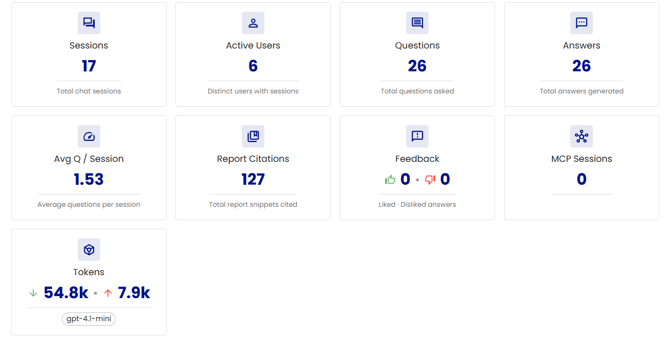
The usage overview page highlights nine key insights from your users MyCatalyst sessions covering the current week, the previous 4 weeks, and the previous 3 months.

The following insights are covered:
Sessions: Total Chat Sessions
Active Users: Distinct users with sessions
Questions: Total questions asked
Answers: Total answers generated
Average Q / Session: Average questions per session
Report Citations: Total report snippets cited
Feedback: Liked - Disliked answers
MCP Sessions: If enabled
Tokens used: Shows the tokens used and the AI model used
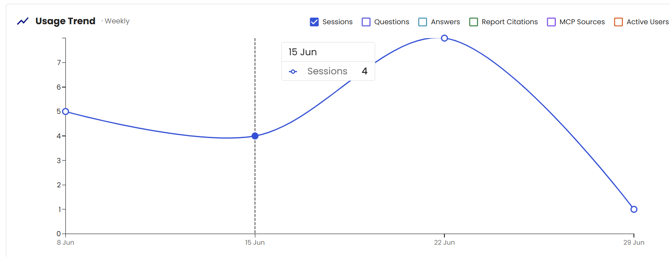
Weekly Usage Trend Graph
Displays a graph of the weekly usage trends. Users with the Usage Analysis or Site Admin rights permissions can check the various options to show the various insights.

Most Cited Reports
Displays a list of cited reports, the assigned category, number of citations and sessions.
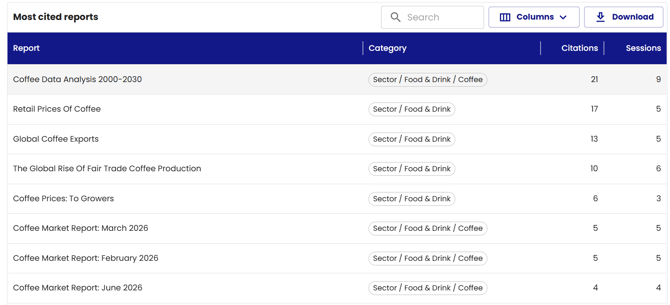
Use the Search option to narrow down specific reports.

Use the columns dropdown to add or remove any columns to the report. 
This report can be downloaded as an excel file using the 'Download' option.

Question Topics
The 'Cluster Question into Topics' slide allows users to display the top ranked Topics searched within a date range time frame.
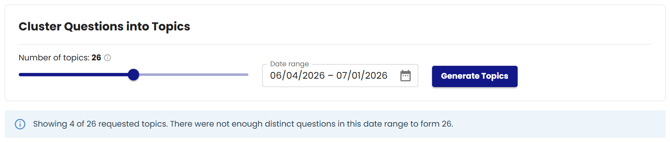
The 'Number of topics' can be set with the slider from 0 - 50 to display the top ranked question topics.
🔔Note: If the Number of Topics target number requested can not be met the generated topics will only show what is available.
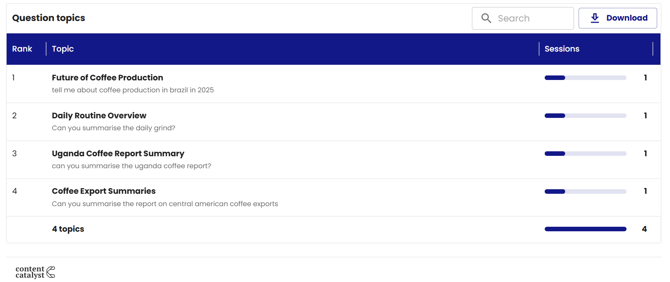
Users can also search this report, or download the report to Excel as a .csv file.
